# Pinout of the Multi Connect Cable

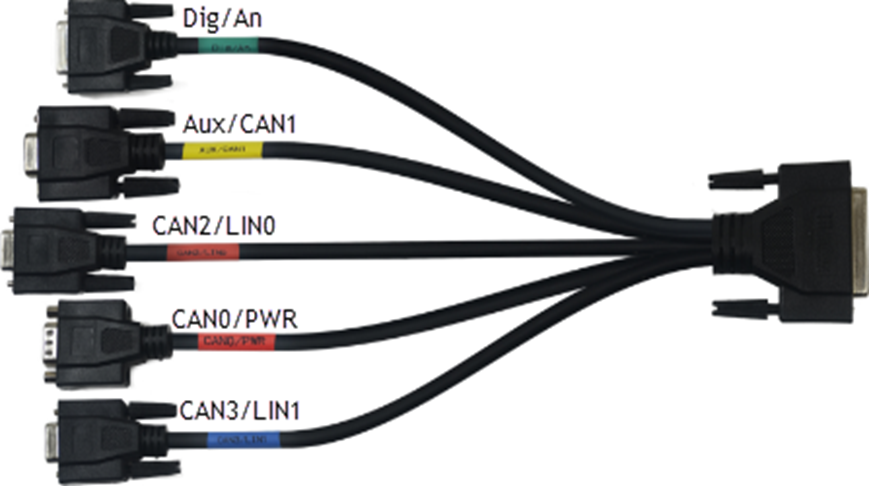
The K-Box may be connected to the multi-connect cable's AUX cable to connect it to the Rebel CT or LT Loggers. The pinout is as follows:

<figure><img src="https://1039220062-files.gitbook.io/~/files/v0/b/gitbook-x-prod.appspot.com/o/spaces%2FRhWtYvkHNZy7Jvdnc3wk%2Fuploads%2FZjQVvrqz3JUX9XpEyKFs%2Fimage.png?alt=media&#x26;token=5e548266-0fb5-4791-aa99-a372e671863b" alt=""><figcaption></figcaption></figure>

#### <mark style="background-color:green;">Dig/An</mark> (This Connector is used to connect Digital and Analog signals to the Logger)

The Dig & An connector is a Female 15-pin Subminiature D Type connector.

<figure><img src="https://1039220062-files.gitbook.io/~/files/v0/b/gitbook-x-prod.appspot.com/o/spaces%2FRhWtYvkHNZy7Jvdnc3wk%2Fuploads%2FQitAwFN0zVscqP2Orwpg%2Fimage.png?alt=media&#x26;token=9d3667a2-9f0a-4bc6-8dd7-3edd298349a3" alt=""><figcaption></figcaption></figure>

<table data-header-hidden><thead><tr><th width="116"></th><th></th></tr></thead><tbody><tr><td><strong>Pin No</strong></td><td><strong>Pin Function</strong></td></tr><tr><td><strong>Pin 2</strong></td><td>Digital Input or Output 1 - When used as an input, do not apply voltages outside the 0 to +12V range. When used as an Output, ensure that the current drawn is not more than 100mA. More information on the use of this pin can be found in Appendix 2 and 3</td></tr><tr><td><strong>Pin 3</strong></td><td>+4.5V Instrumentation Supply Voltage, ensure that current draw is not more than 100mA</td></tr><tr><td><strong>Pin 4</strong></td><td>Ground</td></tr><tr><td><strong>Pin 6</strong></td><td>Analog Ground</td></tr><tr><td><strong>Pin 7</strong></td><td>Analog Input 1 - do not apply voltages outside of the -10 to +10V range</td></tr><tr><td><strong>Pin 8</strong></td><td>Analog Input 3 - do not apply voltages outside of the -10 to +10V range</td></tr><tr><td><strong>Pin 9</strong></td><td>Digital Input or Output 0 - When used as Input, do not apply voltages outside the 0 to +12V range. When used as an Output, ensure that the current drawn is not more than 100mA. More information on the use of this pin can be found in Appendix 2 and 3</td></tr><tr><td><strong>Pin 10</strong></td><td>Digital Input or Output 2 - When used as Input, do not apply voltages outside the 0 to +12V range. When used as an Output, ensure that the current drawn is not more than 100mA. More information on the use of this pin can be found in Appendix 2 and 3</td></tr><tr><td><strong>Pin 11</strong></td><td>Ground</td></tr><tr><td><strong>Pin 13</strong></td><td>Wake-Up pin to wake logger from sleep mode (for use see Appendix 1)</td></tr><tr><td><strong>Pin 14</strong></td><td>Analog Input 0 - do not apply voltages outside of the -10 to +10V range</td></tr><tr><td><strong>Pin 15</strong></td><td>Analog Input 2 - do not apply voltages outside the -10 to +10V range.</td></tr></tbody></table>

#### <mark style="background-color:yellow;">AUX/CAN1</mark> (The port of the Multi Connect Cable that is generally used with the K-Box)

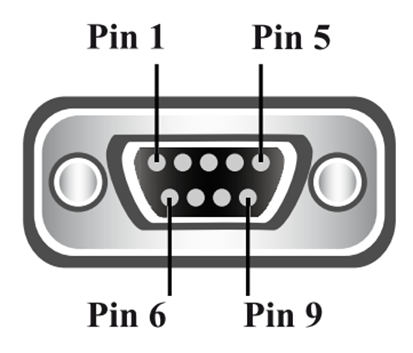
The AUX/CAN1 connector is a Female 9-pin Subminiature D Type connector.

<figure><img src="https://1039220062-files.gitbook.io/~/files/v0/b/gitbook-x-prod.appspot.com/o/spaces%2FRhWtYvkHNZy7Jvdnc3wk%2Fuploads%2F1VQHixJFnDLULjratNjD%2Fimage.png?alt=media&#x26;token=43c4fe9a-2e6e-4da7-bdde-e4f0889fd463" alt=""><figcaption></figcaption></figure>

<table data-header-hidden><thead><tr><th width="115"></th><th></th></tr></thead><tbody><tr><td><strong>Pin No</strong></td><td><strong>Pin Function</strong></td></tr><tr><td><strong>Pin 2</strong></td><td>CAN Bus 1 (Medium Speed Bus) Low Signal</td></tr><tr><td><strong>Pin 3</strong></td><td>Ground</td></tr><tr><td><strong>Pin 5</strong></td><td>Power Ground</td></tr><tr><td><strong>Pin 7</strong></td><td>CAN Bus 1 (Medium Speed Bus) High Signal</td></tr><tr><td><strong>Pin 9</strong></td><td>Power Supply Switched</td></tr></tbody></table>

#### <mark style="background-color:red;">CAN2/LIN0</mark> (Used for connecting CAN2 and Ethernet to the Logger)

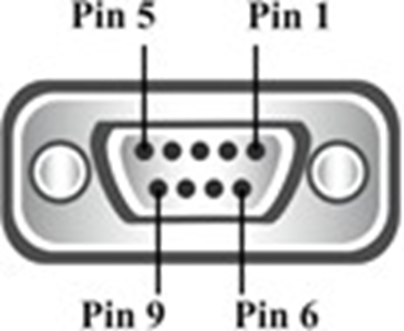
The LAN connector is a Female 9-pin Subminiature D Type connector.

<figure><img src="https://1039220062-files.gitbook.io/~/files/v0/b/gitbook-x-prod.appspot.com/o/spaces%2FRhWtYvkHNZy7Jvdnc3wk%2Fuploads%2FJPAVOJt8zfSHEvzuvS1R%2Fimage.png?alt=media&#x26;token=1d5521bb-7543-45b1-bc6b-93f432a7bda1" alt=""><figcaption></figcaption></figure>

<table data-header-hidden><thead><tr><th width="106"></th><th></th></tr></thead><tbody><tr><td><strong>Pin No</strong></td><td><strong>Pin Function</strong></td></tr><tr><td><strong>Pin 1</strong></td><td>LIN 0</td></tr><tr><td><strong>Pin 2</strong></td><td>CAN / CAN FD Bus 2 (Instrumentation Bus) Low Signal</td></tr><tr><td><strong>Pin 3</strong></td><td>Ground</td></tr><tr><td><strong>Pin 5</strong></td><td>Power Ground</td></tr><tr><td><strong>Pin 7</strong></td><td>CAN / CAN FD Bus 2 (Instrumentation Bus) High Signal</td></tr><tr><td><strong>Pin 9</strong></td><td>Digital Input or Output 3 (can also be used as a switched power supply +Vd). When used as Input, do not apply voltages outside of the 0 to +12V range.</td></tr></tbody></table>

#### <mark style="background-color:red;">CAN0/PWR</mark> (This Connector is used to power the Logger; e.g. it could be powered via the diagnostics connector of a vehicle connected to the OBD2 to DB9 Cable.)

The CAN0/PWR connector is a Male 9-pin Subminiature D Type connector.

<figure><img src="https://1039220062-files.gitbook.io/~/files/v0/b/gitbook-x-prod.appspot.com/o/spaces%2FRhWtYvkHNZy7Jvdnc3wk%2Fuploads%2FQ2lNO9a2I6bTZBAKgbFh%2Fimage.png?alt=media&#x26;token=cf5a98af-5f63-4a57-b484-8fc88a688352" alt=""><figcaption></figcaption></figure>

<table data-header-hidden><thead><tr><th width="118"></th><th></th></tr></thead><tbody><tr><td><strong>Pin No</strong></td><td><strong>Pin Function</strong></td></tr><tr><td><strong>Pin 1</strong></td><td>CAN Bus 1 (Medium Speed Bus) Low Signal</td></tr><tr><td><strong>Pin 2</strong></td><td>CAN Bus 0 (High Speed Bus) Low Signal</td></tr><tr><td><strong>Pin 3</strong></td><td>Ground</td></tr><tr><td><strong>Pin 4</strong></td><td>K-Line (1 wire bus) of ISO 9141</td></tr><tr><td><strong>Pin 5</strong></td><td>Power Ground</td></tr><tr><td><strong>Pin 7</strong></td><td>CAN Bus 0 (High Speed Bus) High Signal</td></tr><tr><td><strong>Pin 8</strong></td><td>CAN Bus 1 (Medium Speed Bus) High Signal</td></tr><tr><td><strong>Pin 9</strong></td><td>4.5-36V Supply Voltage</td></tr></tbody></table>

#### <mark style="background-color:blue;">CAN3/LIN1</mark>

The CAN3/LIN1 is a Female 9-pin standard D-type connector with screws.

<figure><img src="https://1039220062-files.gitbook.io/~/files/v0/b/gitbook-x-prod.appspot.com/o/spaces%2FRhWtYvkHNZy7Jvdnc3wk%2Fuploads%2FjIS9UVHljevzEQHwHVBJ%2Fimage.png?alt=media&#x26;token=035dd9ad-ac03-4f51-bfb2-a666962e19d7" alt=""><figcaption></figcaption></figure>

<table data-header-hidden><thead><tr><th width="138"></th><th></th></tr></thead><tbody><tr><td><strong>Pin No</strong></td><td><strong>Pin Function</strong></td></tr><tr><td><strong>Pin 1</strong></td><td>LIN 1</td></tr><tr><td><strong>Pin 2</strong></td><td>CAN / CAN FD Bus 3 (Instrumentation Bus) Low Signal</td></tr><tr><td><strong>Pin 3</strong></td><td>Ground</td></tr><tr><td><strong>Pin 5</strong></td><td>Power Ground</td></tr><tr><td><strong>Pin 7</strong></td><td>CAN / CAN FD Bus 3 (Instrumentation Bus) High Signal</td></tr><tr><td><strong>Pin 9</strong></td><td>Digital Input or Output 3 (can also be used as a switched power supply +Vd). When used as Input, do not apply voltages outside of the 0 to +12V range.</td></tr></tbody></table>

#### OBD\&INST (The multi-connect cable attaches to the Logger via this connector)

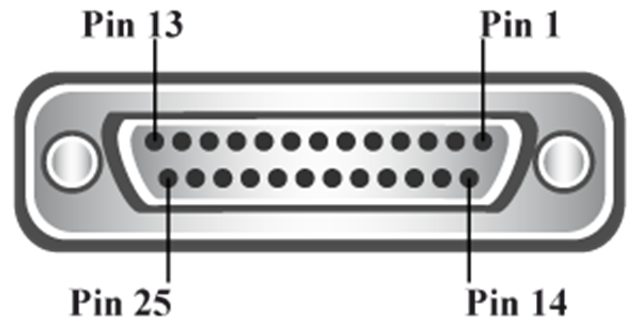
The OBD\&INST connector is a Female 25-pin Subminiature D Type connector.

&#x20;

<figure><img src="https://1039220062-files.gitbook.io/~/files/v0/b/gitbook-x-prod.appspot.com/o/spaces%2FRhWtYvkHNZy7Jvdnc3wk%2Fuploads%2FSH2RHsDBzUv2w5ndzpoJ%2Fimage.png?alt=media&#x26;token=ff58bb9f-494d-4f96-bc24-856f87df4779" alt=""><figcaption></figcaption></figure>

<table data-header-hidden><thead><tr><th width="122"></th><th></th></tr></thead><tbody><tr><td><strong>Pin No</strong></td><td><strong>Pin Function</strong></td></tr><tr><td><strong>Pin 1</strong></td><td>Analog Input 3 - do not apply voltages outside of the -10 to +10V range</td></tr><tr><td><strong>Pin 2</strong></td><td>LIN 1</td></tr><tr><td><strong>Pin 3</strong></td><td>CAN / CAN FD 3 L</td></tr><tr><td><strong>Pin 4</strong></td><td>Analog Input 1 - do not apply voltages outside of the -10 to +10V range</td></tr><tr><td><strong>Pin 5</strong></td><td>Wake-Up pin to wake logger from sleep mode (for use see Appendix 1)</td></tr><tr><td><strong>Pin 6</strong></td><td>CAN Bus 1 (Medium Speed Bus) Low Signal</td></tr><tr><td><strong>Pin 7</strong></td><td>CAN Bus 0 (High-Speed Bus) Low Signal</td></tr><tr><td><strong>Pin 8</strong></td><td>K-Line (1 wire bus) of ISO 9141</td></tr><tr><td><strong>Pin 9</strong></td><td>4.5-36V Supply Voltage</td></tr><tr><td><strong>Pin 10</strong></td><td>+4.5V Instrumentation Supply Voltage, ensure that current draw is not more than 100mA</td></tr><tr><td><strong>Pin 11</strong></td><td>Digital Input or Output 2 - When used as Input, do not apply voltages outside the 0 to +12V range. When used as an Output, ensure that the current drawn is not more than 100mA. More information on the use of this pin can be found in Appendix 2 and 3</td></tr><tr><td><strong>Pin 12</strong></td><td>Digital Input or Output 0 - When used as Input, do not apply voltages outside the 0 to +12V range. When used as an Output, ensure that the current drawn is not more than 100mA. More information on the use of this pin can be found in Appendix 2 and 3</td></tr><tr><td><strong>Pin 13</strong></td><td>CAN / CAN FD Bus 2 (Instrumentation Bus) Low Signal</td></tr><tr><td><strong>Pin 14</strong></td><td>Analog Input 2 - do not apply voltages outside of the -10 to +10V range</td></tr><tr><td><strong>Pin 15</strong></td><td>LIN 0</td></tr><tr><td><strong>Pin 16</strong></td><td>CAN / CAN FD 3 H</td></tr><tr><td><strong>Pin 17</strong></td><td>Analog Input 0 - do not apply voltages outside of the -10 to +10V range</td></tr><tr><td><strong>Pin 18</strong></td><td>Analog Ground</td></tr><tr><td><strong>Pin 19</strong></td><td>CAN Bus 1 (Medium Speed Bus) High Signal</td></tr><tr><td><strong>Pin 20</strong></td><td>CAN Bus 0 (High Speed Bus) High Signal</td></tr><tr><td><strong>Pin 21</strong></td><td>Ground</td></tr><tr><td><strong>Pin 22</strong></td><td>Power Ground</td></tr><tr><td><strong>Pin 23</strong></td><td>Digital Input or Output 3 (can also be used as a switched power supply +Vd)</td></tr><tr><td><strong>Pin 24</strong></td><td>Digital Input or Output 1 - When used as Input, do not apply voltages outside the 0 to +12V range. When used as an Output, ensure that the current drawn is not more than 100mA. More information on the use of this pin can be found in Appendix 2 and 3</td></tr><tr><td><strong>Pin 25</strong></td><td>CAN /CAN FD Bus 2 (Instrumentation Bus) High Signal</td></tr></tbody></table>