> For the complete documentation index, see [llms.txt](https://docs.influxtechnology.com/support_guides/llms.txt). Markdown versions of documentation pages are available by appending `.md` to page URLs; this page is available as [Markdown](https://docs.influxtechnology.com/support_guides/pinouts-influx-product-range/cables-and-product-pinouts/cables/inf-42xx.xx/inf4204.15-molex-5way-db9-splitter-connector.md).

# INF4204.15: MOLEX – 5WAY DB9 SPLITTER CONNECTOR

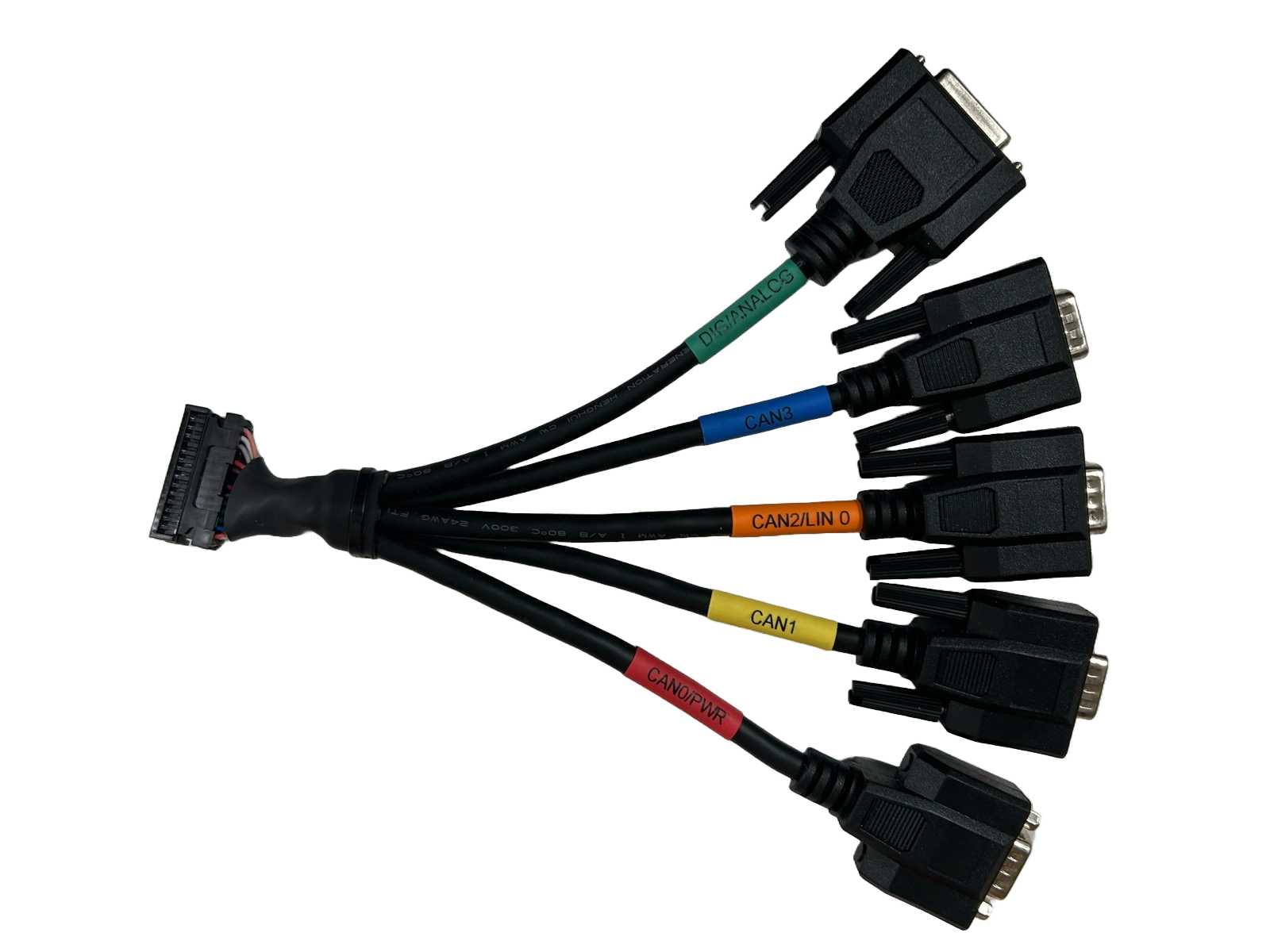
<figure><img src="/files/fzwpvbz9pdahWAu6akbl" alt=""><figcaption><p>MOLEX – 5 Way DB9 SPLITTER CONNECTOR</p></figcaption></figure>

This 15 mm breakout cable is supplied with each ReXgen Air data logger, making it suitable for connecting devices compliant with the standard CIA 9-pin D-Sub pinout directly to our data loggers.

&#x20;The cable has one 24-Way Molex connector, which connects directly to the ReXgen Air data logger and four 9-Way D-Sub connectors to connect up to the separate CAN buses and one 15-Way D-Sub as described here:

* <mark style="color:$tint;">**POWER/CAN0**</mark> enables power and a CAN0 bus to be connected to the ReXgen Air data logger. Type- 9-Way D-Sub (Plug)
* <mark style="color:$tint;">**AUX/CAN 1**</mark> enables a CAN bus to connect to the ReXgen Air data logger and supply auxiliary power from the Rebel data loggers to other devices. Type -9-Way D-Sub (Socket).
* <mark style="color:$tint;">**CAN 2 Type**</mark> - 9-Way D-Sub (Socket)
* <mark style="color:$tint;">**CAN 3 Type**</mark> - 9-Way D-Sub (Socket)
* **Digital/Analog Pin:** 15-Way D-Sub (Socket) connector enables easy connection to the data logger <mark style="color:$tint;">analog and digital pins.</mark>

### Tech Spec:

<table data-header-hidden><thead><tr><th width="165"></th><th></th></tr></thead><tbody><tr><td>Cable Length</td><td>15 Cm</td></tr><tr><td>Cable OD</td><td>6.5mm Twisted pair CAN connections</td></tr><tr><td>Connector</td><td><p>DB9 M with screw*1PCS</p><p>DB9 M with screw *1PCS</p><p>DB9 M with screw *1PCS</p><p>DB9 M with studs*1PCS</p><p>DB15FwithScrew*1PCS</p><p>Molex mini-50 Female</p></td></tr></tbody></table>

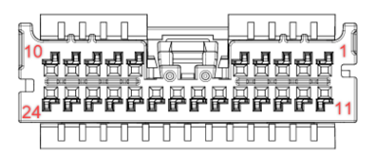
### Molex Connector:

<figure><img src="/files/jGlB3ROXL8pdzjAtuRya" alt=""><figcaption></figcaption></figure>

| **Pins** | **Molex mini-50** | **Pins** | **Molex mini-50** |
| -------- | ----------------- | -------- | ----------------- |
| Pin 1    | RelayOut0         | Pin 13   | ADC0              |
| Pin 2    | DigIn0            | Pin 14   | ERASE             |
| Pin 3    | AnalogGND         | Pin 15   | LIN               |
| Pin 4    | ADC1              | Pin 16   | GND               |
| Pin 5    | Wakeup/Clamp- 15  | Pin 17   | Power GND         |
| Pin 6    | CAN0 Lo           | Pin 18   | 5-31V             |
| Pin 7    | CAN1 Lo           | Pin 19   | CAN0 Hi           |
| Pin 8    | CAN2 Lo           | Pin 20   | CAN1 Hi           |
| Pin 9    | CAN3 Lo           | Pin 21   | CAN2 Hi           |
| Pin 10   | USB DP\_Conn      | Pin 22   | CAN3 Hi           |
| Pin 11   | 4.5V Out          | Pin 23   | USB 5V            |
| Pin 12   | DigIn1            | Pin 24   | USB DM\_Conn      |

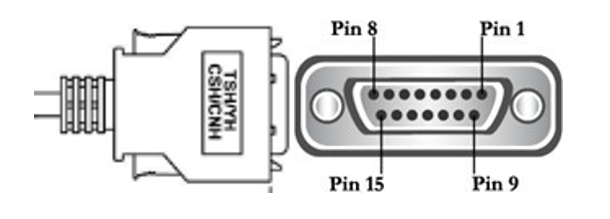
### Digital/Analog Pin (DB-15 Male)

<figure><img src="/files/bUCbn2pf639z4VZiN78c" alt=""><figcaption></figcaption></figure>

<table data-header-hidden><thead><tr><th width="143"></th><th width="179"></th><th width="157"></th><th></th></tr></thead><tbody><tr><td><strong>PIN</strong></td><td><strong>DIG/ANALOG</strong></td><td><strong>PIN</strong></td><td><strong>DIG/ANALOG</strong></td></tr><tr><td>Pin 1</td><td>NC</td><td>Pin 9</td><td>DigIn 0</td></tr><tr><td>Pin 2</td><td>4.5V Out</td><td>Pin 10</td><td>DigIn 1</td></tr><tr><td>Pin 3</td><td>USB Dp_Conn</td><td>Pin 11</td><td>GND</td></tr><tr><td>Pin 4</td><td>USB 5V</td><td>Pin 12</td><td>NC</td></tr><tr><td>Pin 5</td><td>USB DM_Conn</td><td>Pin 13</td><td>WAKE UP/Clamp 15</td></tr><tr><td>Pin6</td><td>Analog GND</td><td>Pin 14</td><td>ADC 0</td></tr><tr><td>Pin 7</td><td>ADC 1</td><td>Pin 15</td><td>NC</td></tr><tr><td>Pin 8</td><td>NC</td><td><p> </p><p> </p><p> </p></td><td><p> </p><p> </p><p> </p></td></tr></tbody></table>

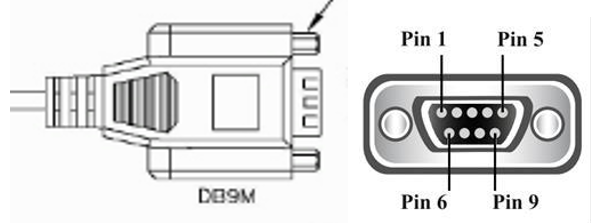
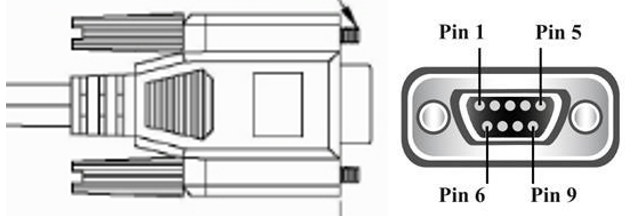
### CAN0/Power (DB-9 Male)

<figure><img src="/files/aUHluBKeEpNbpLOymTvp" alt=""><figcaption></figcaption></figure>

| **PIN** | **CAN0/PWR** |
| ------- | ------------ |
| Pin 1   | NC           |
| Pin 2   | CAN0 Lo      |
| Pin 3   | GND          |
| Pin 4   | NC           |
| Pin 5   | Power GND    |
| Pin6    | NC           |
| Pin 7   | CAN0 Hi      |
| Pin 8   | NC           |
| Pin 9   | 5-31V        |

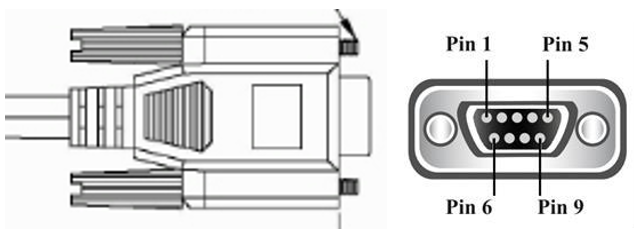
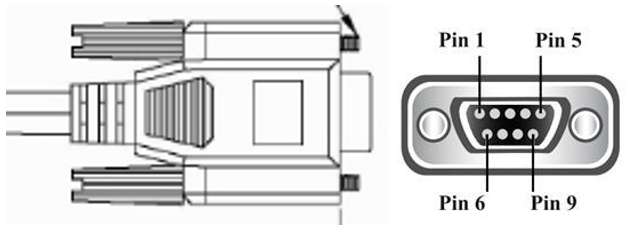
### CAN1 (DB-9 Male)

<figure><img src="/files/hs0MF92ZeknT0iHMttZj" alt=""><figcaption></figcaption></figure>

<table data-header-hidden><thead><tr><th width="248"></th><th></th></tr></thead><tbody><tr><td><strong>PIN</strong></td><td><strong>CAN1</strong></td></tr><tr><td>Pin 1</td><td>NC</td></tr><tr><td>Pin 2</td><td>CAN1 Lo</td></tr><tr><td>Pin 3</td><td>NC</td></tr><tr><td>Pin 4</td><td>NC</td></tr><tr><td>Pin 5</td><td>NC</td></tr><tr><td>Pin 6</td><td>NC</td></tr><tr><td>Pin 7</td><td>CAN1 Hi</td></tr><tr><td>Pin 8</td><td>NC</td></tr><tr><td>Pin 9</td><td>NC</td></tr></tbody></table>

### CAN 2 (DB-9 Male)

<figure><img src="/files/zYyWpdSka7hO987ujkGG" alt=""><figcaption></figcaption></figure>

| **PIN** | C**AN2**  |
| ------- | --------- |
| Pin 1   | LIN       |
| Pin 2   | CAN2 Lo   |
| Pin 3   | GND       |
| Pin 4   | NC        |
| Pin 5   | Power GND |
| Pin6    | NC        |
| Pin 7   | CAN2 Hi   |
| Pin 8   | NC        |
| Pin 9   | NC        |

### CAN 3 (DB-9 Male)

<figure><img src="/files/VhJcqxgiJDWwebV4yXnZ" alt=""><figcaption></figcaption></figure>

<table data-header-hidden><thead><tr><th width="239"></th><th></th></tr></thead><tbody><tr><td><strong>PIN</strong></td><td><strong>CAN3</strong></td></tr><tr><td>Pin 1</td><td>NC</td></tr><tr><td>Pin 2</td><td>CAN3 Lo</td></tr><tr><td>Pin 3</td><td>NC</td></tr><tr><td>Pin 4</td><td>NC</td></tr><tr><td>Pin 5</td><td>NC</td></tr><tr><td>Pin6</td><td>NC</td></tr><tr><td>Pin 7</td><td>CAN3 Hi</td></tr><tr><td>Pin 8</td><td>NC</td></tr><tr><td>Pin 9</td><td>NC</td></tr></tbody></table>


---

# Agent Instructions
This documentation is published with GitBook. GitBook is the documentation platform designed so that both humans and AI agents can read, navigate, and reason over technical content effectively. Learn more at gitbook.com.

## Querying This Documentation
If you need additional information that is not directly available in this page, you can query the documentation dynamically by asking a question.

Perform an HTTP GET request on the current page URL with the `ask` query parameter:

```
GET https://docs.influxtechnology.com/support_guides/pinouts-influx-product-range/cables-and-product-pinouts/cables/inf-42xx.xx/inf4204.15-molex-5way-db9-splitter-connector.md?ask=<question>
```

The question should be specific, self-contained, and written in natural language.
The response will contain a direct answer to the question and relevant excerpts and sources from the documentation.

Use this mechanism when the answer is not explicitly present in the current page, you need clarification or additional context, or you want to retrieve related documentation sections.