# Pinout of the OBD2 to DB9 Cable

The Standard Display Cable may be connected to the optional DB9 to OBD2 Cable for direct connection to the Diagnostics CAN bus and power in a vehicle. The pinout of that cable is as follows:

&#x20;

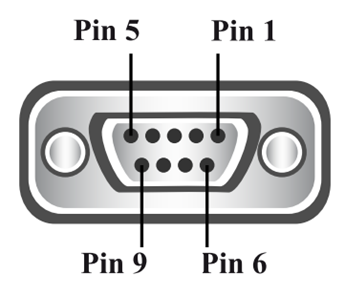
<figure><img src="https://3464783984-files.gitbook.io/~/files/v0/b/gitbook-x-prod.appspot.com/o/spaces%2FSTCGZzKYrBpVw1q9UATP%2Fuploads%2Fz6n9Qrj9vQHGuX1Lrj2e%2Fimage.png?alt=media&#x26;token=e6556fb1-b3df-4cd0-9db0-9fcc85922b63" alt=""><figcaption><p>Female 9-pin Standard D-Type Connector</p></figcaption></figure>

<table data-header-hidden><thead><tr><th width="113"></th><th></th></tr></thead><tbody><tr><td><strong>DB9</strong></td><td><strong>Pin Function</strong></td></tr><tr><td><strong>Pin 2</strong></td><td>CAN L</td></tr><tr><td><strong>Pin 3</strong></td><td>Ground</td></tr><tr><td><strong>Pin 5</strong></td><td>Ground</td></tr><tr><td><strong>Pin 7</strong></td><td>CAN H</td></tr><tr><td><strong>Pin 9</strong></td><td>Power Supply 10-32V</td></tr></tbody></table>

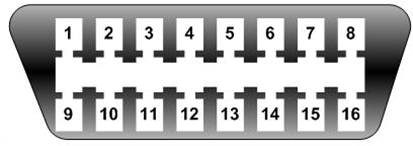
<figure><img src="https://3464783984-files.gitbook.io/~/files/v0/b/gitbook-x-prod.appspot.com/o/spaces%2FSTCGZzKYrBpVw1q9UATP%2Fuploads%2F4Nx3uwztzfMifp53NFr4%2Fimage.png?alt=media&#x26;token=d4bbd828-9316-4d0f-854d-4e662d422432" alt=""><figcaption><p>Standard OBD2 connector</p></figcaption></figure>

<table data-header-hidden><thead><tr><th width="115"></th><th></th></tr></thead><tbody><tr><td><strong>OBD2</strong></td><td><strong>Pin Function</strong></td></tr><tr><td><strong>Pin 4</strong></td><td>Ground</td></tr><tr><td><strong>Pin 5</strong></td><td>Ground</td></tr><tr><td><strong>Pin 6</strong></td><td>CAN H</td></tr><tr><td><strong>Pin 14</strong></td><td>CAN L</td></tr><tr><td><strong>Pin 16</strong></td><td>Battery Power</td></tr></tbody></table>

{% hint style="info" %}

#### Note:

* Pins not mentioned in the description table(s) are NC.
  {% endhint %}