Gateway Routing CAN0 to CAN1.

In this example, we will see how we can configure a ReXgen data logger to route all the CAN traffic from CAN 0 Bus to CAN 1 Bus

Documentation

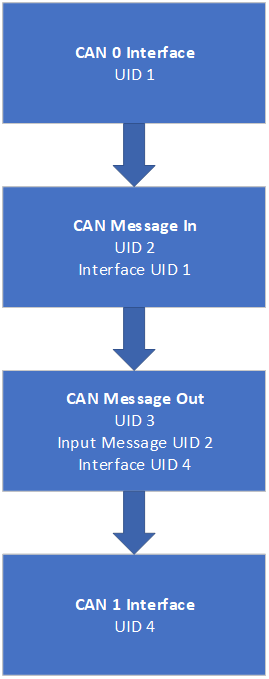
Below image shows how each element are linked in the XML file.

image

They are connected using Unique IDs (UID).

Default Settings

  • CAN Baud Rate: 500 Kbps

  • All CAN IDs are Routed

The following parameters can be modified by editing the XML as required.

Modifying CAN Baud Rate:

Edit the value of the CANBusSpeed element in the XML file under the CAN interface block. Value has to be specified in bps

Users can load the XML file into the ReXgen logger using the ReXdesk application/ReXdesk Convert application or the Rxlibrary DLL.

The process to send XML to logger using ReXdesk. Click on Config Menu > Run > Run Config Using External File > Browse the XML file and click Open.

Last updated